Mastering the Keyboard: The Power of Control Keys in 2026
By UBANDOMA ICT WORLD | Your Gateway to Digital Excellence
In the world of computing, speed is everything. Whether you are a student in Takum preparing a project or a professional managing a business, the way you interact with your computer determines your productivity. While the mouse is a great tool, the real "power users" know that the secret to efficiency lies right under their fingertips: The Control Keys.
At UBANDOMA ICT WORLD, we believe that mastering keyboard shortcuts is the first step toward digital native status. Today, we are breaking down the essential Control (Ctrl) key combinations that every computer user should have in their mental toolkit.
What is the Control Key?
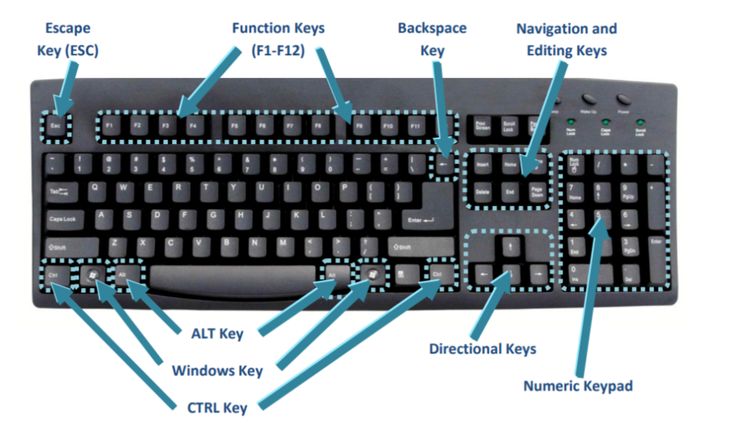
The Control key, labeled as Ctrl on your keyboard, is a "modifier" key. This means it doesn't usually do anything on its own. Instead, it works in harmony with other keys to perform specific actions that would otherwise require multiple mouse clicks. By using these shortcuts, you reduce strain on your wrists and complete tasks up to three times faster.
The Essential Control Key Shortcuts
Below is the ultimate list of Control key combinations used in Windows and most document editing software like Microsoft Word, Google Docs, and Excel.
Ctrl + A: Select All. Use this to highlight every piece of text or every file in a folder instantly.
Ctrl + B: Bold. Quickly emphasize important text by making it thicker.
Ctrl + C: Copy. The most famous shortcut. It places selected items into your digital clipboard.
Ctrl + D: Bookmark/Font. In a web browser, it saves the page; in Word, it opens font options.
Ctrl + E: Center Alignment. Perfect for centering headings in your documents.
Ctrl + F: Find. This opens a search bar to find a specific word within a page or document.
Ctrl + G: Go To. Helps you jump to a specific page or line in a large document.
Ctrl + H: Replace. Find a specific word and replace it with another across the entire file.
Ctrl + I: Italic. Tilts your text for emphasis or for titles of works.
Ctrl + J: Justify. Aligns your text evenly along both the left and right margins.
Ctrl + K: Insert Hyperlink. Turn any highlighted text into a clickable web link.
Ctrl + L: Left Align. The standard alignment for most professional writing.
Ctrl + N: New. Opens a brand new document, window, or tab instantly.
Ctrl + O: Open. Allows you to browse your files to open an existing document.
Ctrl + P: Print. Sends your current document or webpage straight to the printer.
Ctrl + S: Save. The most important shortcut! Use this constantly to avoid losing your work.
Ctrl + U: Underline. Adds a line beneath your selected text.
Ctrl + V: Paste. Takes whatever you copied (Ctrl + C) and places it where your cursor is.
Ctrl + W: Close. Quickly closes the current tab or window you are working in.
Ctrl + X: Cut. Removes the selected item and saves it to the clipboard to be moved elsewhere.
Ctrl + Y: Redo. Reverses an "Undo" action.
Ctrl + Z: Undo. The "Life Saver." Use this to reverse your last mistake.
Ctrl + Esc: Opens the Start Menu without needing to click the Windows icon.
Ctrl + Shift + Esc: Opens the Task Manager directly to manage frozen programs.
Mastering these keys will transform your computer experience from a struggle into a smooth, professional workflow. At UBANDOMA ICT WORLD, we offer hands-on training to help you master these shortcuts and many more advanced computing skills.
Ready to Level Up?
Would you like me to create a printable "Shortcut Cheat Sheet" PDF that you can keep on your desk for quick reference?
💬 Comments 0
No comments yet. Be the first to leave one!
✍️ Leave a Comment